ARENA
Technology
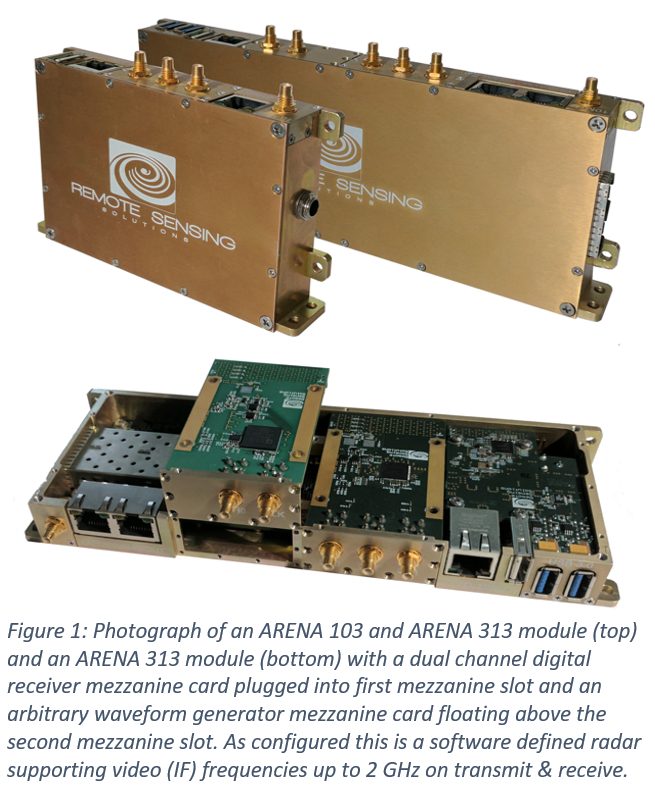
ARENA technology can transform a radar, sonar or radiometer by enabling significant miniaturization; unparalleled processing; adaptive control, waveform generation and signal processing; and seamless integration into network sensor environments. Physically not much larger than a smart phone, ARENAs can be embedded into the sensors they serve.
ARENA
Radar
Tomorrow.io’s ARENA Team designs, builds and deploys advanced radar systems and technology to support our customers’ application and mission needs. With a broad range of expertise, our scientists and engineers provide radar solutions from initial modeling stages through full system design and development. Following development, the ARENA Team provides field deployment design, along with operational and data analysis support.
Engineering Services
System
- Geophysical modeling and development
- Radar system design and development
- Digital system design and development
- Data acquisition design and development
- Network system design
- Initial concept to full system prototyping and field demonstration
- Data analysis
Hardware
- Digital subsystem design and development:
- Arbitrary waveform generators and up converters
- Digital receivers and data acquisition
- Digital I/O, control and timing generation
- Software radio design and development
- Transceiver design and development
- Network-based data acquisition design and development
Mission Design and Planning
- Ground-based and airborne field campaign design, planning and oversight
- Sensor-in-a-loop simulation for ground, airborne and satellite missions
- Digital system design and development
- Post mission data analysis and performance assessment
Firmware
- Custom FPGA firmware design, simulation and prototyping
- Linux-based driver development
ARENA Customers and Partners